


We can all relate to the challenge of efficiently gathering information needed to set priorities for a given day or week. A new AI agent from Microsoft is designed to streamline that process and place the focus on advancing priorities rather than wrangling information to figure out what those priorities are.
The Planner Agent can help bring work from various sources together while performing task management within Microsoft 365 Copilot to identify what needs attention and keep projects moving.
Questions, Answers and Next Steps
A user can tap Planner Agent to ask questions across multiple sources – this can include private tasks for the individual, tasks specifically assigned to that individual as part of a project, or flagged emails that include tasks.
Example questions a user might ask include:
- “Identify tasks with deliverables due this week and help me prioritize among those tasks and their deliverables so I meet deadlines”
- “Summarize urgent tasks in the product launch plan, highlight the biggest risks, and help me determine what needs my attention now”
Planner Agent’s doesn’t just retrieve data or tasks. It will help understand urgency, risk, and next steps so a user can transition to action without having to assemble all the details.
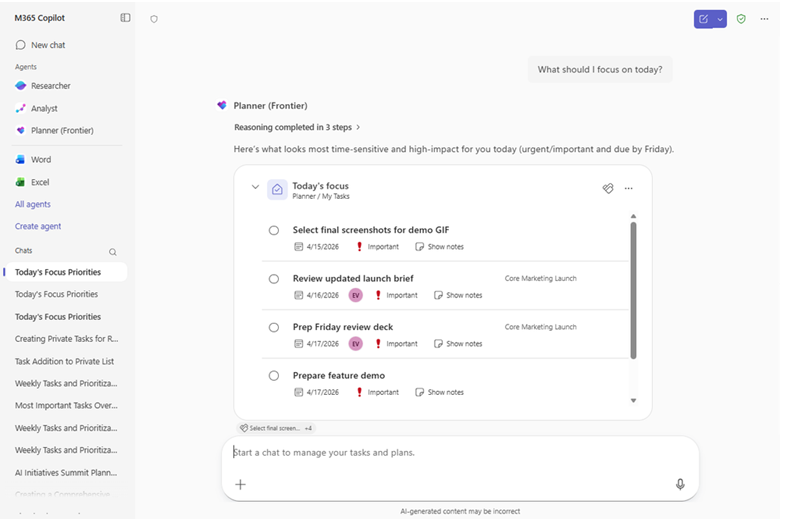
Planner Agent can also create new tasks inside Copilot Chat. Users can create a single task, draft multiple tasks, or ground task creation in enterprise content such as email, chats, files, or meeting content. This helps turn work that’s still being discussed into action items. For example, a user can review an email thread, ask Planner Agent to turn follow-ups into tasks, review the suggested task titles and due dates, and confirm the plan before tasks are added to a plan.
Sample requests include:
- “Review my emails from today and draft private tasks for the most urgent follow-ups”
- “Turn follow-ups from this meeting into tasks in the Marketing plan.”
Update Tasks Within Conversations
Planner Agent also lets a user edit existing tasks in both private tasks and team plans. A user can make updates in natural language or directly in an interactive task card. Examples of changes include updating a task name, status, date, or priority – all within Copilot.
Examples include:
- “Adjust the deadline of my task to this Friday and increase the priority to Important”
- “For tasks assigned to me across shared plans, push out anything due next week by one week”
A user can review, refine, and confirm task and plan updates before committing them, keeping work efficient and accurate. Once confirmed, these changes are reflected directly in the Planner inside Copilot.
Build Structured Plans
Planner Agent goes beyond managing tasks: It can help draft a plan for review based on a request or a grounded source.
Planner Agent finds the correct reference document, confirms it with the user, and drafts a plan based on that source. A plan will include hierarchy and organization, with goals specified for team work. This is especially helpful when turning a large collection of information into an actionable plan. Instead of starting from scratch, a user begins with a goal, deadline, or source document. Planner Agent then provides a structured draft with milestones and tasks that can be quickly refined and saved to Planner.
An example request:
- “Draft a plan for an upcoming conference. Break it down into goals and include the appropriate task details.”
Planner Agent is available now in Microsoft 365 Copilot through the Frontier program for eligible Microsoft 365 tenants. Users need an active Microsoft 365 Copilot license.
More AI Agent Insights:
- SharePoint AI Features Remember and Apply Business Rules
- Microsoft Refines Research Agent’s Depth, Quality By Tapping Anthropic and OpenAI Models
- Copilot Cowork Marshals Corporate Intelligence, AI To Execute Complex Tasks
For a 36-Hour Immersion into the FY28 Priorities that define Partner Success in the AI Era, join us at the AI Business Solutions Partner Executive Summit, running August 3-4, 2027, in Renton, WA. Register today.

Tom Smith
Analyst
Cloud Wars, Agent and Copilot

Related Posts