

Microsoft is making it easier for developers to launch AI agents with enterprise-grade controls. Now, previously built AI agents that run locally on the desktop can be imported into the Agent 365 “control plane” where they come under the auspices of governance and secure data access controls.
In so doing, the company is advancing a core objective of customers, namely to advance their AI projects beyond pilots and individual-user productivity initatives to enterprise-level productivity, with the robust controls that enterprises require.
Developers are building a wide range of agents using a variety of tools including LangChain, OpenAI, Semantic Kernel, Azure AI Foundry, and more. While those agents are built with orchestration logic, they’re not built with enterprise-required controls including identity management, observability, governance, testing, and secure access to data stored in Microsoft 365 apps.
Before Microsoft’s new capability, called Agent 365 Skills, developers and users needed to work through a range of steps to achieve enterprise readiness. These included: installing the Agent 365 Command Line Interface (CLI), validating Azure prerequisites, configuring Entra identity management artifacts, connecting Model Context Protocol (MCP) servers, testing locally, and more. Each step was dependent on others in the sequence, so any misstep or failure broke the process and delayed production launch.
Agent 365 Skills simplifies that process with a guided, natural-language experience inside the coding assistant developers already use. Developers can describe what they need — “add observability,” or “test this agent locally,” for example. In response, the skill detects the project, asks required questions, makes changes, and validates the work — while preserving the technical controls enterprise teams depend on.
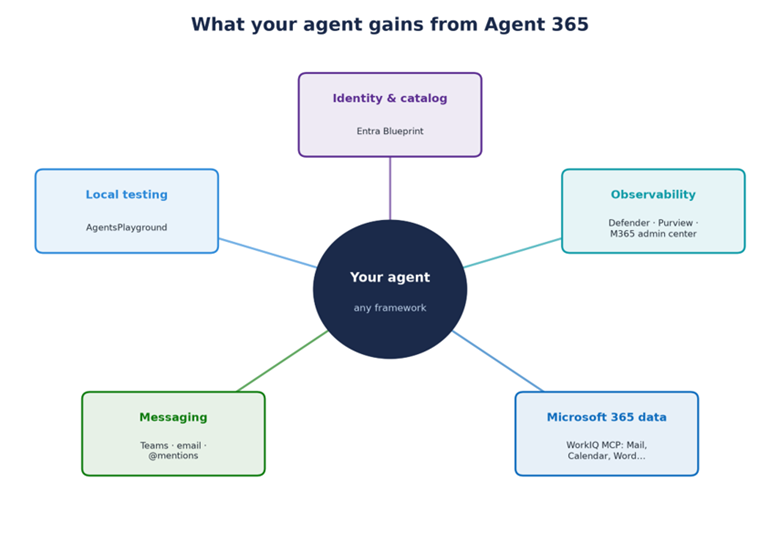
Agent 365 Skills includes six skills that map to the agent lifecycle steps that developers manage as they prepare an agent for use with Microsoft 365:
- “a365-setup,” which installs the agent CLI and validates Azure prerequisites
- “make-a365-agent” which registers a blueprint for agents that need observability or catalog visibility
- “instrument-observability” which ensures agents appear in Microsoft Defender, Purview, and the Microsoft 365 admin center
- “add-workiq-tools” which connect WorkIQ MCP Servers so the agent can read and act on Microsoft 365 data
- “make-ai-teammate” which enables the agent to receive messages over Teams
- “test-local” which launches the agent in “AgentsPlayground” sandbox for quick, surface-level testing, referred to as “smoke testing”
While developers gain significant efficiencies by shortening the path from prototype, or locally used, agent to enterprise-ready status, IT and security teams get more consistent registration, observability, and governance across their agent estate, regardless of the origination point for individual agents. They should also benefit from a larger pool of enterprise-grade agents to automate key functions, without the friction previously involved in making those agents usable by a broad set of employees.
Related Microsoft AI Analysis:
- Governance Tools Ensure AI Agents Play Within the Rules at Runtime
- How Agent 365 and WorkIQ Redefine Business in the AI Era
- Microsoft Extends Reach of Copilot Cowork to Mobile Devices and New Data Sources
- Agent 365: The Platform That Keeps CIOs in Charge as Agents Proliferate
For a 36-Hour Immersion into the FY28 Priorities that define Partner Success in the AI Era, join us at the AI Business Solutions Partner Executive Summit, running August 3-4, 2027, in Renton, WA. Register today.

Tom Smith
Analyst
Cloud Wars, Agent and Copilot

Related Posts